WordPressプラグインを作って使ってみる方法を調べた

WordPressプラグインを作って上げる方法を調べて見ました
開発環境で行なっています

まずはpluginsディレクトリに移動
$ cd wp-content/plugins/

ディレクトリを作ります、ディレクトリ名はなんでもOK
$ mkdir sample-plugin

phpファイルを作ってコードを決まり文句を書きます、ファイル名はなんでもOK
$ vi sample-plugin.php


<?php
/*
 * Plugin Name: sample plugin
 * Plugin URI: http://www.example.com/plugin
 * Description: はじめてのプラグイン
 * Author: bgbgbg
 * Version: 0.1
 * Author URI: http://www.example.com
 * */

これだけで
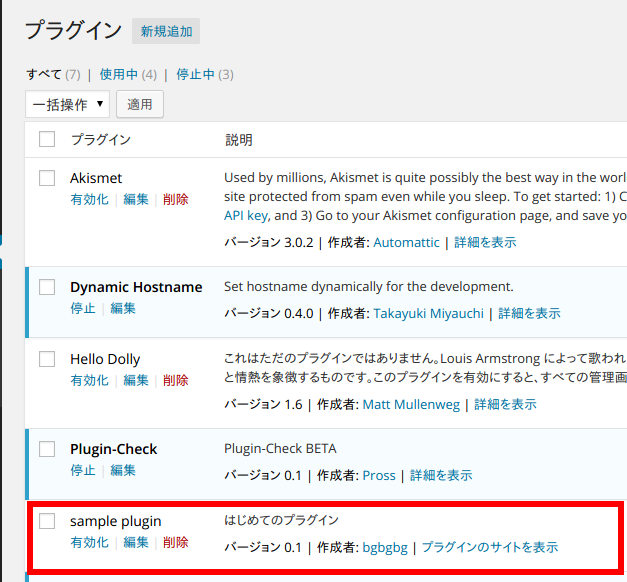
wordpress-plugin
もうプラグインのところに、でてきます

違う環境にあてちゃう時はプラグインのディレクトリをzipで圧縮
$ zip -r sample-plugin.zip (WordPressのディレクトリ)/wp-content/plugins/sample-plugin
としてzipファイルを、プラグインの新規追加からあげればできます

Lineで知らない人からの通知がきたのでちょっと調べてみた

Lineでこんな通知がきました
line-nofriend

電話番号がばれて追加されたみたいです

写真をキャプチャして検索してみたら
越智ゆらの、って人でした
http://ameblo.jp/yulano/day-20140423.html
Googleのイメージ検索でひっかかりました

ブラウザのシークレットモードでのってるアドレスを叩くと
linechat.jpにつながりました
linechat

whoisでドメインの管理者を調べて見ました
http://whois.ansi.co.jp/linechat.jp
ドメイン代行会社の登録だけでわからず

これぐらいで暇つぶし終わります

git diff でpatchファイルを作ってみる

git管理下の開発環境での修正をまとめて、git管理してない本番環境へ適用したかったのでpatchファイルを作って見ました

サンプルとしてこんなディレクトリ構成として

$ tree
.
├── 1
│   ├── 1-1
│   │   └── 1.1.text
│   ├── 1.txt
│   ├── 2.txt
│   └── 3.txt
└── 2
    ├── 1-1
    │   └── 1.1.text
    ├── 1.txt
    └── 2.txt

ちょこっとファイルを修正してcommitして

$ git diff -u HEAD^ > diff.patch
$ cat diff.patch
diff --git a/1/1-1/1.1.text b/1/1-1/1.1.text
index d7cd238..f4cb53a 100644
--- a/1/1-1/1.1.text
+++ b/1/1-1/1.1.text
@@ -1 +1,2 @@
+1-1
 2-1
diff --git a/1/1.txt b/1/1.txt
index 5f2f16b..092362d 100644
--- a/1/1.txt
+++ b/1/1.txt
@@ -1 +1 @@
-1111
+this is 1.

と、git diffの結果を出力してあげます
注意するのは、実際のディレクトリの前にa、bがついています(差の比較のための印)

本番環境へgit diffを出力したのと同じ階層のディレクトリにdiff.patchを移動させて、patchコマンドで取り込みます
そのままpatchコマンドであてると、ディレクトリがないと怒られます

$ patch < diff.patch
can't find file to patch at input line 5
Perhaps you should have used the -p or --strip option?
The text leading up to this was:
--------------------------
|diff --git a/1/1-1/1.1.text b/1/1-1/1.1.text
|index d7cd238..f4cb53a 100644
|--- a/1/1-1/1.1.text
|+++ b/1/1-1/1.1.text
--------------------------
File to patch: 

a、bディレクトリ分の1階層を無視してあてます

$ patch -p1 < diff.patch
patching file 1/1-1/1.1.text
patching file 1/1.txt

これで差分があたりました
実際はあてる前に、patch –dry-run -p1 < diff.patch として確かめてからあてたほうがいいです
(これだと、結果は出してくれるが、実際は更新されない)

また、git diffのときに–no-prefixをつけると

$ git diff -u --no-prefix HEAD^ > diff.patch
$ cat diff.patch
diff --git 1/1-1/1.1.text 1/1-1/1.1.text
index d7cd238..f4cb53a 100644
--- 1/1-1/1.1.text
+++ 1/1-1/1.1.text
@@ -1 +1,2 @@
+1-1
 2-1
diff --git 1/1.txt 1/1.txt
index 5f2f16b..092362d 100644
--- 1/1.txt
+++ 1/1.txt
@@ -1 +1 @@
-1111
+this is 1.

と、a、bがつかなくなるので、patchコマンド時にそのままあてられます

git diff でbranch間の差をみてみる

branch1とbranch2があるとして

branch1とbranch2のすべてのファイルの差が見るなら
$ git diff (branch1) (branch2)

特定の同じ名前ファイルだけなら
$ git diff (branch1) (branch2) (ファイル名)

違う名前のファイルの差をみるなら
$ git diff (branch1):(ファイル名) (branch2):(ファイル名2)